
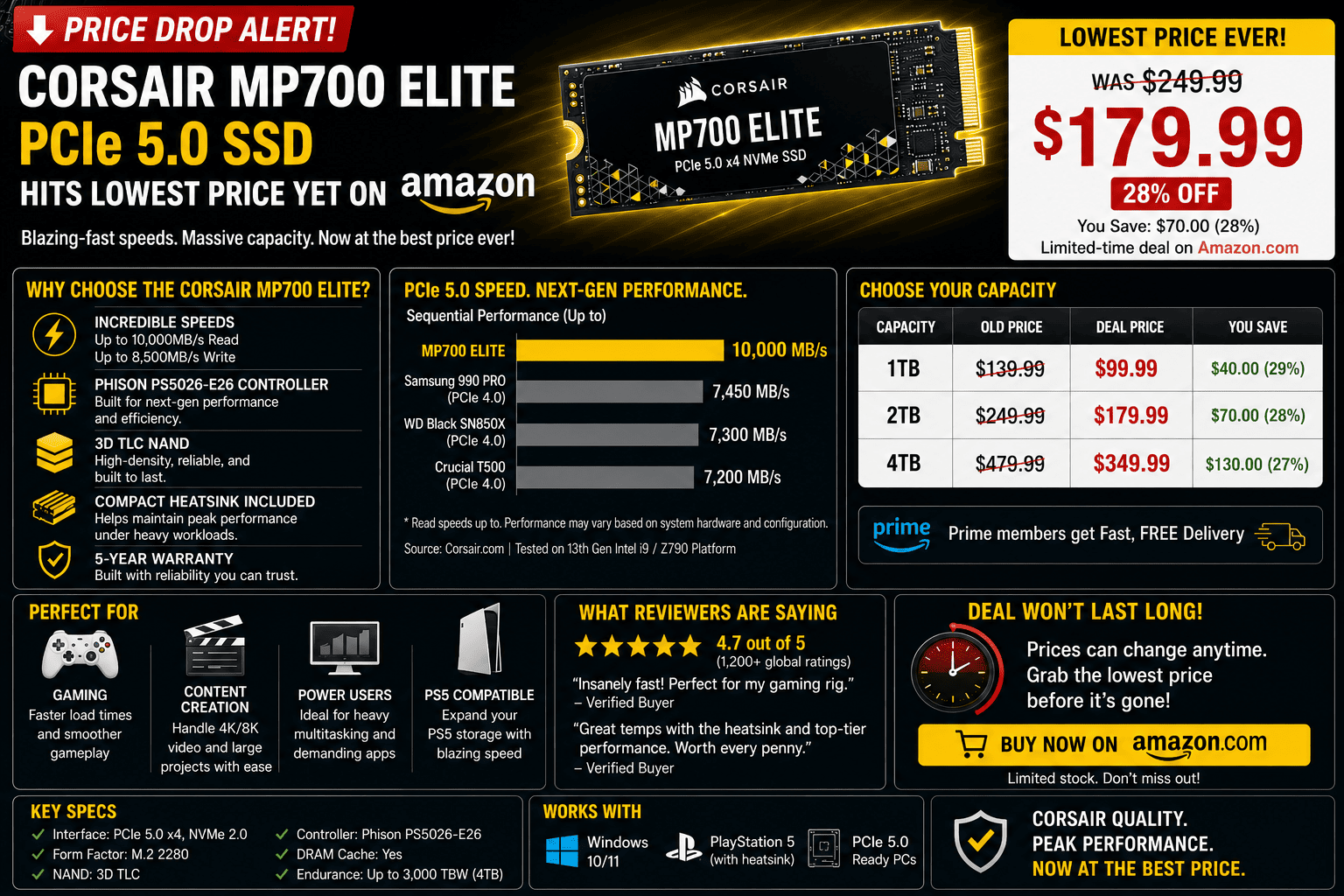
Price Drop Alert: Corsair MP700 Elite PCIe 5.0 SSD Hits Lowest Price Yet on Amazon
If you’ve been holding off on upgrading to next-generation PCIe Gen 5 storage because of sky-high launch pricing, now might be the time to make your move. The Corsair MP700 Elite 2TB PCIe 5.0 NVMe SSD has dropped to an all-time low price of $699.99 on Amazon—marking a massive price cut for one of the most accessible Gen 5 flagships on the market.
While PCIe 5.0 SSDs initially debuted as ultra-expensive, niche components for extreme enthusiasts, deals like this are finally bringing 10,000+ MB/s speeds into realistic territory for modern gaming rigs and high-end workstation builds.
Here is a breakdown of what the MP700 Elite brings to the table, how its thermals hold up, and what you need to check in your system before pulling the trigger.
The Performance Breakdown: Is PCIe Gen 5 Worth It?
The Corsair MP700 Elite sits in a strategic “sweet spot” for PCIe 5.0 storage. Rather than pushing ultra-hot 14,000 MB/s limits that require massive active dual-fan coolers, Corsair tuned the MP700 Elite for balanced performance and thermal efficiency.
Key Specs at a Glance:
-
Sequential Read Speed: Up to 10,000 MB/s
-
Sequential Write Speed: Up to 8,500 MB/s
-
Interface: PCIe Gen 5.0 x4 (NVMe 2.0)
-
NAND Flash: 3D TLC NAND
-
Form Factor: M.2 2280
To put those numbers into perspective, the MP700 Elite delivers roughly 40% faster sequential throughput than top-tier PCIe Gen 4 drives (like the Samsung 990 PRO or WD Black SN850X). For heavy video editors handling raw 8K timelines, 3D animators shuffling multi-gigabyte asset libraries, or gamers preparing for heavy DirectStorage titles, the bandwidth bump is substantial.
Thermal Reality: Do You Need a Heatsink?
Gen 5 controllers are notorious for running much hotter than older Gen 3 and Gen 4 silicon.
While the MP700 Elite is more power-efficient than first-generation Phison E26 drives, you cannot run this SSD completely bare under sustained workloads.
[ Bare Gen 5 SSD ]  ──( Sustained Writes )──> Spikes past 75°C ──> Thermal Throttling / Slowdown
[ Motherboard Heatsink ] ──> Maintains ~58°C - 65°C ──> Stable 10,000 MB/s Performance
If you buy the non-heatsink version on sale, ensure your motherboard’s primary M.2 slot includes a built-in heavy aluminum heat shield with a high-quality thermal pad. Running a Gen 5 drive without adequate cooling will cause the controller to rapidly hit its thermal ceiling, triggering performance throttling down to SATA-like speeds to save itself from cooking.
Hardware Checklist Before You Buy
Before hitting “Add to Cart,” verify that your PC platform is actually equipped to utilize a PCIe 5.0 drive:
-
Motherboard Support: Ensure your CPU and motherboard natively support PCIe 5.0 on the primary M.2 slot (such as Intel Z790/Z890 or AMD AM5 X670E/X870E platforms).
-
PCIe Lane Allocation: Double-check your motherboard manual to ensure occupying the Gen 5 M.2 slot doesn’t split your primary graphics card slot down from x16 to x8 mode.
-
Backwards Compatibility: While the MP700 Elite will physically work in older PCIe 4.0 slots, it will be hard-capped at Gen 4 speeds (~7,400 MB/s), completely defeating the purpose of paying extra for a Gen 5 drive.
How to Verify Your Drive Upon Arrival
Whenever you score a major deal on high-end storage, always verify the hardware the moment it arrives:
-
Check the Telemetry in CrystalDiskInfo: Open CrystalDiskInfo and check the Transfer Mode line. It should read
PCIe 5.0 x4 | PCIe 5.0 x4. If it showsPCIe 4.0orx2, your drive is trapped in a secondary or lane-shared slot. -
Audit Active Thermals: Run a quick benchmark using CrystalDiskMark while monitoring the Temperature badge in CrystalDiskInfo. If the badge turns red or breaches 70°C, adjust your PC case airflow or upgrade your M.2 heatsink.
At $699.99 for 2TB of Gen 5 performance, the Corsair MP700 Elite is one of the most compelling high-speed storage upgrades available today—just make sure your cooling setup is ready to handle the speed!