TLC vs. QLC SSDs: Why Your Cheap Storage Choice Might Trigger an Early ‘Caution’ Status
If you’ve been shopping for a new NVMe drive lately, you’ve probably noticed a massive price gap between drives that look almost identical on paper.
Take a budget-friendly 2TB drive from an entry-level brand. It’s cheap, it boasts decent speeds, and it fits perfectly into your PC or Steam Deck. But right next to it is a premium 2TB drive (like the new Samsung 9100 PRO) that costs nearly double.
Why the massive premium? It usually comes down to three letters hidden deep in the spec sheet: TLC vs. QLC.
While buying a cheap QLC drive feels great for your wallet today, that budget-friendly choice might explain why your CrystalDiskInfo health status starts dropping down to a yellow “Caution” warning much sooner than you ever expected. Here is the plain-English breakdown of why cheap storage burns out faster.
The Core Difference: How Many Guests in One Room?
To understand why these drives wear out at different speeds, we have to look at how they physically hold your data using NAND flash cells.
Imagine an SSD as a massive apartment building filled with tiny rooms (cells), and bits of data as the guests staying inside them.
-
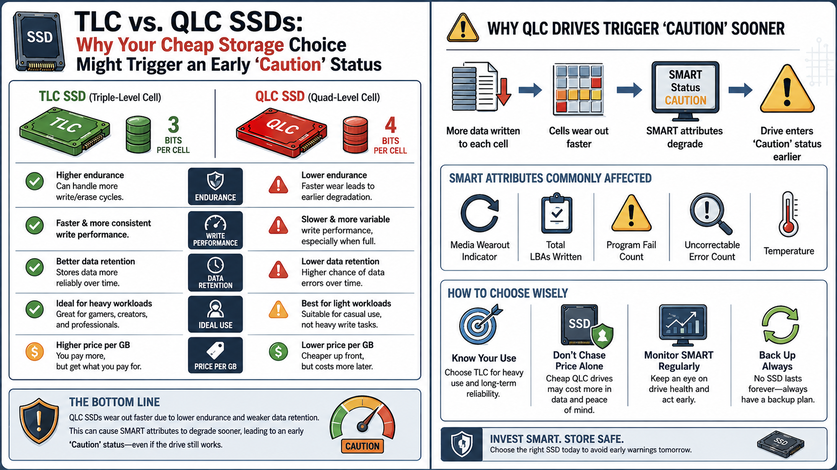
TLC (Triple-Level Cell): Stacks 3 bits of data per cell. To read the data, the drive’s controller has to manage 8 different voltage states. It’s the current “sweet spot” for performance and longevity.
-
QLC (Quad-Level Cell): Crams 4 bits of data into that exact same microscopic cell. To handle that extra bit, the controller has to manage 16 different voltage states.
Cramming a fourth bit into a cell sounds like an absolute win for storage capacity, but it forces the drive to operate with razor-thin margins of error.
Every time you write data to a cell, you physically degrade it by pushing electrons through a microscopic insulating wall. Because QLC cells have 16 ultra-precise voltage levels, even a tiny amount of cell wear makes it incredibly difficult for the controller to accurately read the data.
Why QLC Drives Trigger the ‘Caution’ Status Early
When you open CrystalDiskInfo, the software reads your drive’s internal S.M.A.R.T. health data. QLC drives hit the dangerous thresholds much quicker because of two major factors:
1. The Shocking Drop in TBW (Total Bytes Written)
An SSD’s lifespan is officially measured in TBW—the total amount of data you can write to the drive before the manufacturer can no longer guarantee the cells will hold a charge. The disparity between technologies is immense:
-
A standard 1TB TLC drive usually offers an endurance rating of 600 TBW.
-
A budget 1TB QLC drive typically plummets down to just 150 to 200 TBW.
If you are a content creator rendering 4K video, a gamer constantly installing 150GB patches, or someone running local AI models, you will exhaust that 150 TBW allowance rapidly. Once you pass that threshold, CrystalDiskInfo’s Percentage Used value will climb aggressively, pushing your drive straight into the yellow “Caution” zone.
2. High Write Amplification (The “Shuffling” Penalty)
Because QLC cells are so tightly packed, the drive cannot simply write a tiny 4KB file onto an empty spot. It often has to read an entire massive block of data, clear it, shuffle everything around, and rewrite it.
This behavior is called Write Amplification. You might think you only wrote 10GB of files to your drive today, but behind the scenes, your cheap QLC controller physically wore down the cells by writing 30GB worth of data shuffling. This massive internal stress causes Current Pending Sectors [C5] and Reallocated Sectors [05] to show up far earlier in your drive’s lifecycle.
TLC vs. QLC: Real-World Comparison
| Feature | TLC SSDs (The Premium Choice) | QLC SSDs (The Budget Choice) |
| Bits Per Cell | 3 Bits (8 voltage states) | 4 Bits (16 voltage states) |
| Typical Lifespan (1TB) | 600+ TBW | 150 – 200 TBW |
| Sustained Write Speed | Fast and consistent | Plunges significantly during massive transfers |
| CrystalDiskInfo Risk | Low (Stays “Good” for years) | High (Rapidly drops if used heavily) |
| Best Used For | OS Boot Drives, Gaming, Heavy Creation | Mass game libraries, Media archives, Cold storage |
Which One Should You Buy?
Don’t mistake this for a total takedown of QLC technology. QLC drives have taken massive leaps forward recently (such as high-capacity 4TB expansion drives), and they are absolutely brilliant for secondary storage. If you just need a cheap drive to hold a massive library of single-player Steam games or archive your family movies, QLC is an excellent, cost-effective option because you are mostly reading data, not constantly writing it.
However, never use a cheap QLC drive as your main Windows boot drive (C: Drive). Your operating system is constantly writing temporary files, background logs, and cache data to the drive 24/7. Putting a low-TBW QLC drive under that kind of constant pressure is a surefire way to see a yellow “Caution” warning flashing on your screen within a couple of years.
Spend a little extra cash on a high-quality TLC drive for your main system. Your peace of mind—and your CrystalDiskInfo dashboard—will thank you down the road.