
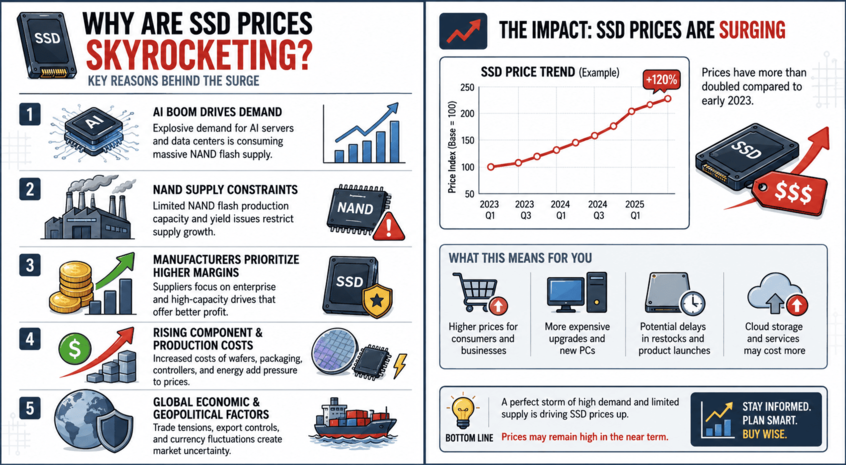
Why Are SSD Prices Skyrocketing? (And How to Protect Your Current Drive)
If you’ve looked at the price of a solid-state drive lately, you probably had to double-check your screen.
Just a year or two ago, you could casually hop onto Amazon or Newegg and grab a blazing-fast 2TB NVMe SSD for a modest $120 to $150. It felt like the golden age of cheap storage. Fast forward to today, and that exact same 2TB drive is sitting closer to $300. Even budget-tier 1TB drives have completely doubled in price, while premium next-gen storage like the Samsung 9100 PRO will easily set you back nearly $480.
What on earth happened? Did the factories burn down? Is it just corporate greed?
The short answer is a perfect storm of economic shifts, manufacturing cuts, and one massive, data-hungry tech boom. Let’s break down exactly why SSD prices are exploding and, more importantly, what you can do to save your wallet.
1. The Real Culprit: AI is Devouring the World’s Storage
We hear about Artificial Intelligence everywhere, but it isn’t just taking over software—it’s physically eating up the hardware supply chain.
Every modern SSD relies on NAND Flash memory (the microscopic chips that actually hold your data). The massive tech giants building AI data centers need an astronomical amount of high-speed storage to train and run their large language models.
Because enterprise data centers are willing to pay top dollar and sign massive contracts, chip manufacturers like Samsung, SK Hynix, and Micron have shifted their factories away from consumer storage. When a factory can make a massive profit selling premium enterprise chips to tech billionaires, making budget 1TB drives for gaming PCs falls to the bottom of the priority list.
In fact, the global NAND shortage is so intense that major component brands like ADATA and TeamGroup are collectively borrowing nearly $880 million just to afford buying raw memory chips to build their consumer drives.
2. NAND Wafer Prices Have Gone Vertical
Because the global demand for AI infrastructure is completely outstripping what factories can produce, the cost of raw materials has gone completely haywire.
Industry reports show that NAND flash contract prices have surged quarter-after-quarter. With raw material and clean-room fabrication plant costs jumping up sharply, manufacturers have no choice but to pass those expenses directly down to us—the consumers.
What Can You Realistically Do About It?
Since market experts warn that this storage squeeze will likely drag out through the rest of the year, waiting for a massive price drop isn’t a viable strategy right now. Instead, the smartest move you can make is to take care of the storage you already own. Here is your proactive checklist to keep your current drive alive and avoid paying the “2026 tax” on a replacement:
Step 1: Keep a Hawk-Eye on CrystalDiskInfo
Don’t wait for your PC to hit you with a Blue Screen of Death. Fire up CrystalDiskInfo regularly and monitor your health metrics. Look closely at your Percentage Used and Media and Data Integrity Errors. If your drive status is a steady blue “Good,” you’re in the clear. If it drops to a yellow “Caution,” you know it’s time to start organizing your files before a sudden failure forces your hand.
Step 2: Manage Your Drive’s Thermals
Heat is the absolute silent killer of modern M.2 NVMe drives. High-speed drives run incredibly hot under load. If your SSD is constantly idling above 60°C, its lifespan is actively degrading. Make sure your drive has a proper motherboard heatsink attached, replace any dried-out factory thermal pads, and ensure your PC case has solid intake airflow.
Step 3: Stop Treating Your SSD Like a Trash Can
SSDs degrade based on how much data is written to them (measured as Terabytes Written, or TBW). If you are constantly downloading, deleting, and re-downloading massive 150GB modern games just to clear space, you are actively burning through your drive’s lifespan. Be selective about what you install, and utilize older, cheaper external mechanical hard drives for basic file archiving.
The Final Verdict
We are officially living through a “RAMpocalypse” and storage crunch. The days of treating high-speed NVMe storage like a cheap commodity are temporarily on pause.
If you absolutely need an upgrade right now for a new build or a critical work machine, bite the bullet and buy it—waiting a few months likely won’t save you much money. But if your current storage is holding up fine, look after it, keep it cool, monitor it with CrystalDiskInfo, and let your current hardware ride out the storm.