
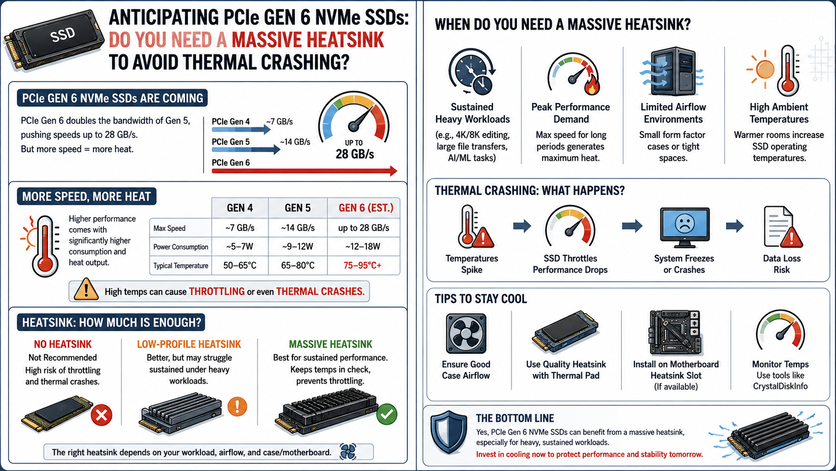
Anticipating PCIe Gen 6 NVMe SSDs: Do You Need a Massive Heatsink to Avoid Thermal Crashing?
Just when you thought your system couldn’t possibly get any faster, the tech world is already gearing up for the next massive leap in storage technology: PCIe Gen 6 NVMe SSDs.
If you remember the jump from Gen 4 to Gen 6 platforms, you know that doubling bandwidth always brings an unexpected guest to the party: heat. Current high-end Gen 5 drives already push speeds up to 14,500 MB/s, but they require heavy motherboard armor or active mini-fans just to stay operational.
With Gen 6 drives threatening to smash through the 28,000 MB/s barrier, the hardware community is asking a critical question: Are our M.2 slots about to turn into literal miniature furnaces? Do we need massive, tower-style heatsinks just to keep our systems from crashing?
Let’s look at the engineering reality behind Gen 6 storage and what it means for your PC’s thermals.
The Gen 6 Speed Beast: Why It Runs Hot
To understand the thermal challenges, we have to look at the math. PCIe Gen 6 doubles the bandwidth of Gen 5 by moving from NRZ (Non-Return-to-Zero) signaling to PAM4 (Pulse Amplitude Modulation 4-level) signaling. This allows the drive to pack twice as much data into the exact same physical space over the lanes.
Processing that much data requires a massive upgrade to the SSD controller (the “brain” of the drive).
-
The Controller Problem: Next-gen controllers fabricated on ultra-dense nodes (like TSMC’s 5nm or 6nm processes) draw significantly more power under heavy mixed workloads.
-
The Wattage Spike: While older Gen 4 drives capped out around 6 to 9 watts of power consumption, elite Gen 6 enterprise and enthusiast consumer drives are projected to push 11 to 14 watts under sustained read/write cycles.
When you push 14 watts of electrical power through a chip the size of a postage stamp, it generates heat incredibly fast. Without a massive cooling solution, a bare Gen 6 drive will hit its thermal ceiling in less than 5 seconds of sustained load.
What Happens When an NVMe Drive Crosses the Red Line?
If you run a high-speed drive without adequate cooling, you won’t just see a high temperature readout in CrystalDiskInfo. You will experience severe performance stability issues:
-
The Thermal Throttling Cliff: Modern SSD controllers are programmed with aggressive thermal guardrails. When the temperature sensor hits 70°C to 75°C, the controller artificially slashes its clock speeds to protect the NAND flash cells from permanent physical degradation. Your 28,000 MB/s dream drive will instantly plunge down to less than 2,000 MB/s.
-
Thermal Crashing (BSOD): If the controller fails to shed heat quickly enough and breaches 80°C to 85°C, it triggers an emergency shutdown. To Windows, it looks like the boot drive completely vanished from the system, resulting in a sudden freeze or a Blue Screen of Death (BSOD).
Tracking the Danger Zone in CrystalDiskInfo
When Gen 6 drives hit the market, monitoring your health metrics will be more vital than ever. Here is how to interpret your drive’s internal temperature sensors:
-
Blue/Green (Under 55°C): The gold standard. Your drive is completely safe, and you are getting 100% of the advertised bandwidth.
-
Yellow (56°C to 68°C): Heavy Load. This is perfectly normal during intensive tasks like transferring 100GB game files via DirectStorage, rendering 8K video, or compiling large code repositories.
-
Red (69°C and Above): Critical Risk. Your drive is actively thermal throttling or dangerously close to an abrupt thermal crash.
The Verdict: Do You Need a Massive Heatsink?
The short answer is yes, but it might not have to look like a giant block of metal sticking out of your motherboard. While the earliest engineering samples of Gen 6 controllers run incredibly hot, major chip manufacturers are fighting back using two primary design choices:
1. Active Airflow is King
You don’t necessarily need a tower-style heatsink that blocks your graphics card, but you will need active airflow. Small, silent 20mm or 30mm fans built directly into low-profile M.2 heatsinks are becoming the industry standard. A tiny fan pushing direct air across a copper fin array is significantly more effective than a giant passive block of aluminum sitting in stagnant air.
2. Monolithic Liquid Cooling Integration
For high-end enthusiast PC builders utilizing upcoming premium processors, motherboard manufacturers are already designing built-in M.2 waterblocks that route directly into custom liquid cooling loops.
The Takeaway for crystalmarkinfo.com Readers
If you plan on upgrading to a PCIe Gen 6 drive down the road, never buy a bare drive. Ensure your upcoming motherboard choice features heavy, high-surface-area integrated M.2 cooling armor, or budget an extra $30 to $40 for an active, fan-assisted third-party heatsink. Keep your hardware cool, keep your data safe, and let CrystalDiskInfo handle the monitoring!